
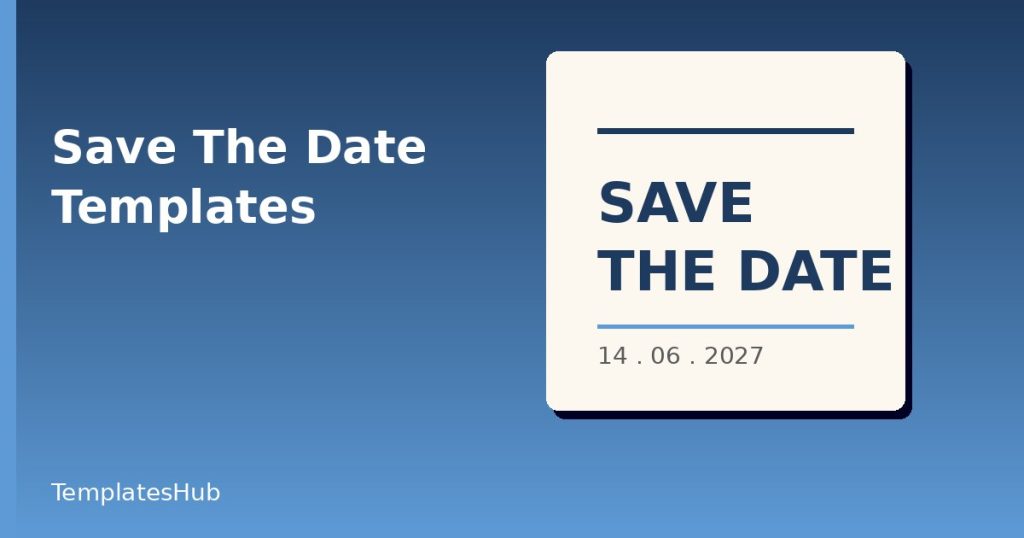
Save the date templates exist for one simple reason: guests need to block out a day long before the invitation arrives. A short, attractive notice does that job, and a ready-made layout means you can finish it in an evening. This article covers what the notice should say, when to send it, and how to pick and adjust a design so it feels like part of your event.
What Save the Date Templates Are For
It is not an invitation. It tells people that something is happening, when and roughly where, so they can arrange leave, book travel and avoid clashing plans. Formal details such as dress code, accommodation and reply instructions come later. For that reason, the card can be short and uncluttered.
What to Include
Keep to the essentials:
- The names of the hosts or the event title.
- The date, written clearly, including the year if the event is more than a few months away.
- The city or venue, if confirmed.
- A line saying that a formal invitation will follow.
- A website address or contact if guests will find more details online.
If the venue is not set, name the town or region only. Avoid promising things you cannot yet deliver, such as a precise start time.
When to Send It
Timing depends on the size and nature of the event. For a wedding, send four to eight months ahead, and up to twelve if guests must travel overseas or the date falls in a holiday period. For a milestone birthday or an anniversary party, two to three months is typical. Corporate events and conferences often send save-the-dates six to twelve weeks in advance, depending on the audience.
Send it as soon as the date and location are certain. An early notice that later changes is worse than a slightly later one that is firm.
Choosing Among Save the Date Templates
Think about tone. A formal wedding suits a serif typeface, generous margins and a restrained palette. A garden party may call for botanical drawings or watercolour washes. A company event could use a bold colour block and a modern sans serif.
Photo templates are popular for couples, because they put faces on the card. For those, pick a photo with open space, so text can sit clearly without covering anyone. If you prefer type-only designs, choose a template where the date is the visual focus.
Print or Digital?
Printed cards feel personal and can sit on a fridge, but they cost more and take longer. Digital versions can be emailed or sent by text message, and they suit informal events and tighter budgets. Many hosts do both, sending printed cards to older relatives and digital copies to everyone else. Choose a template that is offered in formats for both: a high-resolution PDF for printing and a PNG for screens.
Customising Without Losing Balance
Replace the placeholder text, then check alignment and spacing. Names and dates should stay readable at arm’s length, so avoid shrinking text to squeeze in extras. Limit yourself to two fonts. If you change the colours, test contrast, especially pale text on a photo.
Proofread with care. Misspelled names or a wrong date are painful when you have printed fifty copies. Read the date aloud, check the day of the week matches the calendar, and ask someone else to look at it.
Printing Tips
Use a heavier card stock, around 300 gsm, for a premium feel. Check the printer’s bleed requirements: if a design has colour to the edge, you need an extra 3 millimetres around it. Order a single sample first. Envelopes should be ready, and addresses collected, before the cards arrive.
Wording Examples You Can Adapt
For a wedding: “Save the date for the wedding of Amira and Daniel, 14 June 2027, Lisbon. Invitation to follow.” For a birthday: “Mark the date: Sam turns 40, Saturday 9 March, an evening in Leeds. Details soon.” For a company event: “Annual partner summit, 21 to 22 October, Berlin. Registration opens in September.” Notice that each states who, when and where in a single glance, and promises more details later.
Following Up
After the save-the-date, keep a simple tracker with names, addresses and replies. When the invitation follows, the style should echo the first notice so guests recognise it. For email invitations and reminders, our beginner guide to email marketing shares habits that help messages land in inboxes.
If you are building a small website with details for guests, how to choose a website template explains what to look for.
Final Thoughts
A good save the date is short, accurate and pleasant to look at. Choose a template that fits the mood, send it in good time, and make sure every detail on it is right. The early notice sets the tone for the whole event, and it takes only a little care to get it right.

Written by thadmin_r7
The Templates Hub editorial team writes practical, plain-English guides for everyday readers.
More articles by this author →
Free Online Invitation Templates: Edit, Share, and RSVP
There is a particular convenience in making an invitation without installing anything. You open a page, choose a…

Invitation Templates for Weddings, Parties and Events
Invitation templates give you a polished layout for weddings, birthdays, baby showers and work events without hiring a…

Wedding Invitations Templates: Building a Matching Suite
Wedding invitations templates for a full matching set: save-the-dates, invites, RSVP cards and thank-you notes with one colour,…
Wedding Invitation Templates: Wording, Layout and Printing
Wedding invitation templates with tips on wording, layout, paper, print or digital delivery, timing and the details every…