
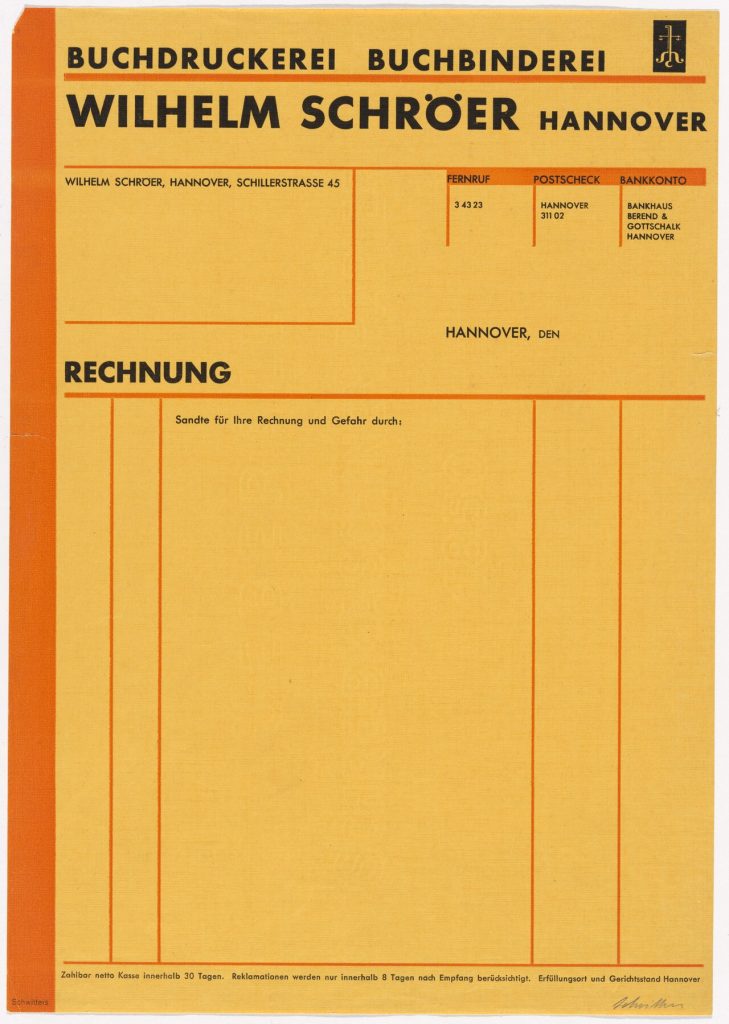
Invoice templates save time and make you look professional, which matters when you want to be paid promptly. A clear invoice leaves no room for questions: the client knows what they are paying for, how much, by when and how. This guide covers what belongs on one and how to make a template you can reuse for years.
Invoice templates: the essential fields
Every invoice should show:
- Your business name, address and contact details.
- The client’s name and address.
- A unique invoice number.
- The issue date and the due date.
- A description of each product or service, with quantity and price.
- Subtotal, taxes and the total due.
- Payment methods and bank details.
Depending on your country, you may also need a tax or VAT number. Check local rules, because legal requirements differ.
Setting payment terms
Terms such as “Net 14” or “Net 30” tell the client how many days they have. Shorter terms improve cash flow. State any late fee clearly and make sure it was agreed in your contract; see what is a contract for the basics. A polite line like “Payment is due within 14 days of the invoice date” is enough.
Numbering that makes sense
Use a simple sequence, such as 2026-001, 2026-002. Never reuse a number. If you correct an invoice, issue a credit note rather than quietly editing the original. Good numbering makes bookkeeping and audits far easier.
Choosing a format
Word or Google Docs
Simple to edit and familiar. The risk is accidental changes and formulas that do not exist, so double-check totals.
Spreadsheet
Formulas calculate totals and tax. A sheet also doubles as a record of all invoices. Compare layouts in invoices templates.
Invoicing software
Online tools send reminders and accept card payments. They cost money, but save time if you invoice often.
Make your invoice look professional
Add your logo, use one or two fonts and align columns neatly. Put the total due in bold near the top or bottom right, where people look first. Keep the page to one side of A4 or Letter if possible. Export as PDF so formatting stays fixed.
Sending and following up
Email the invoice with a short, friendly message. Mention the amount, the due date and how to pay. If the date passes, send a reminder, then a firmer follow-up. A polite template for each stage saves effort. For writing such messages, see letter templates.
Common mistakes
- Vague descriptions such as “services”.
- Missing due dates.
- No contact for questions.
- Wrong client details.
- Forgetting to record the invoice in your books. Read small business bookkeeping basics for a routine.
Pricing and quoting
An invoice should match the earlier quote. If scope changed, explain it in a line. For help with prices, read how to price your services.
Handling international clients
When you invoice overseas, state the currency in bold, include IBAN or SWIFT details if needed and mention who pays transfer fees. Check whether you must charge tax on cross-border services; rules vary and a short chat with an accountant is worthwhile. Use plain English and avoid abbreviations your client might not know.
Deposits and recurring billing
For large projects, ask for a deposit before starting and show it on the final invoice as a credit. For retainers, send invoices on the same day each month so the client can plan. Consistency reduces late payments more than any reminder does.
A sample payment note
“Thank you for your business. Please pay within 14 days using the details below. If you have a question about any line, reply to this email and I will gladly explain.” Short, polite and unmistakably clear.
Keeping invoices tidy over time
Create a folder per year, with subfolders per client. Save every invoice as a PDF the moment you send it, and record payment dates next to it. When tax season arrives you will have everything in one place and a clear picture of your income.
Tax and record-keeping basics
Keep invoices, receipts and bank statements together. Record income when it is earned or received, according to your local rules. Set aside a share of every payment for tax, and ask a local accountant about deadlines. Good records turn tax season from a scramble into a routine.
Branding your invoices
Use your logo, brand colours and a friendly sign-off. A small thank-you line makes a difference. Consistent branding across invoices, proposals and emails helps clients remember you and reinforces that you run a professional business.
Frequently asked questions
Do I need a lawyer to make an invoice?
No, but make sure it meets tax rules in your country.
Can I invoice before the work is complete?
Yes, if agreed, for example a deposit or milestone payment.
How long should I keep invoices?
Keep them for the period your tax authority requires, commonly five to seven years.

Written by thadmin_r7
The Templates Hub editorial team writes practical, plain-English guides for everyday readers.
More articles by this author →
Outlook Templates Missing? 5 Causes and Quick Fixes
You open a new message, look for the little My Templates icon and it simply is not there.…

Outlook Templates: Save Time on Repeated Emails and Replies
If you type the same email four times a week, you are doing a job that Outlook templates…

Outlook Signature Templates: Design and Install in Minutes
Every email you send ends with a small piece of branding you did not have to think about,…

Newsletter Templates Free: Best Sources and What to Check
You do not need a design budget to send a tidy email. Plenty of tools and websites offer…